> **平台**: 万维易源 (ShowAPI)
> **接入方式**: 统一 API 网关 (HTTPS POST/GET)
> **认证**: showapi_appid + showapi_sign
> **文档**: https://www.showapi.com/apiGateway/view/2004/3
---
title: "select | count | PostgreSQL转HTTP接口 | API 市场 | 万维易源"
canonical_url: "https://www.showapi.com/apiGateway/view/2004/3"
last_updated: "2026-08-16T16:35:11.365Z"
meta:
description: 根据条件上,查询某个table的记录列表。
keywords: 关系数据库,showapi,万维易源,易源接口,api开放平台,开放api,api大全,api接口,接口中心,接口大全,开放平台,api,大数据,接口,API
"og:description": 根据条件上,查询某个table的记录列表。
"og:title": "select | count | PostgreSQL转HTTP接口 | API 市场"
---
*
*
*
# **PostgreSQL转HTTP接口**
**连接器**
需两次购买:①订购原厂商接口 ②免费接口,注册后直接调用;本连接器可将您的postgreSQL数据库接口转化为HTTP接口,大大提升开发效率。包括增删查改以及数据库级别的建表、建索引等所有指令。也可以自定义SQL语句并嵌入变量的方式调用。演示时默认使用的是公用测试库,数据不定期清理。如需要用于生产环境, 请绑定自己的postgreSQL数据即可。
[关系数据库](https://www.showapi.com/market?search=%E5%85%B3%E7%B3%BB%E6%95%B0%E6%8D%AE%E5%BA%93)
**免费接口,注册即用,无需单独购买。 **
在线调试
**连接器服务**
免费接口,注册后直接调用
- 原厂商
- [易源官方](https://www.showapi.com/)
- 转发服务商
- 昆明秀派科技有限公司
- 电话
- 400-998-8033
- QQ
- 4009988033
- 邮箱
- [service@showapi.com](mailto:service@showapi.com)
- 所属分类
- IT技术
- 接入点
- 9 个
- 请求方式
- POST/GET
- 返回格式
- JSON
**select-count**
接入点说明
```
根据条件上,查询某个table的记录列表。
```
接口地址
https://connector.showapi.com/2004-3?appKey={your\_appKey} [查看密钥](https://www.showapi.com/console#/myApp) [调用帮助](https://www.showapi.com/helpcenter/view#/3960/1)
返回格式JSON
请求方式POST/GET
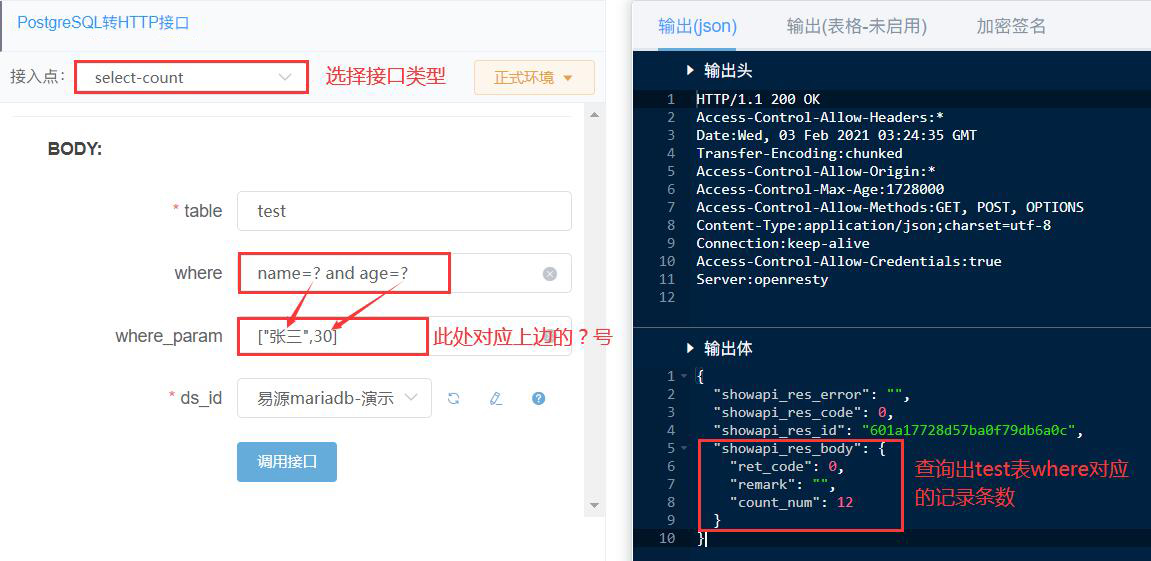
**案例截图**
**请求参数**
**Header 参数**
| |
|
| |
|
**Post 表单**
| |
|
| |
|
| |
| |
| |
**返回参数**查看公共返回参数
该接口返回经 `showapi_res_body` 系统封装,业务数据均位于该对象内;系统级字段见公共返回参数。
**返回体**
| |
|
| |
|
| |
| |
**请求示例**
[查看我的 appKey](https://www.showapi.com/console#/myApp) [查看使用向导](https://www.showapi.com/helpcenter/view#/3960/1) [Python / Java 等多语言示例](https://www.showapi.com/apitest/market/2004/3)
cURL 复制
```
curl -X POST "https://connector.showapi.com/2004-3?appKey=YOUR_APPKEY" \
-H "content-type: application/x-www-form-urlencoded" \
-d "table=user&where=name%3D%3F%20and%20age%3D%3F&where_param=%5B%22%E5%BC%A0%E4%B8%89%22%2C30%5D&ds_id="
```
**返回示例**
JSON 复制
```
{
"showapi_res_error": "",
"showapi_res_id": "09cd9d79b11649149c9da6fdd246a5ab",
"showapi_res_code": 0,
"showapi_res_body": {
"count_num": 5,
"remark": "",
"ret_code": 0
}
}
```
**MCP 服务集成**接口级
在 Cherry Studio、ChatBox 等支持 MCP 的客户端中配置,将 {your\_appKey} 替换为真实 AppKey( [AppKey 管理](https://www.showapi.com/console#/myApp))。该服务覆盖本接口全部接入点。
MCP JSON 复制
```
{
"mcpServers": {
"showapi-mcp-2004": {
"url": "http://www.showapi.com.cn/mcp/2004/{your_appKey}"
}
}
}
```
**OpenAPI 文档**接口级
标准 OpenAPI 3.0 文档,覆盖本接口全部接入点,可导入 Apifox / Postman / Swagger UI,或供 AI Agent 直接消费。
[在线查看 YAML](https://www.showapi.com/openapi/market/2004.yaml) [下载 YAML](https://www.showapi.com/openapi/market/2004.yaml) [查看 JSON](https://www.showapi.com/openapi/market/2004.json)