百度云-文字识别
连接器

百度云-文字识别

连接器

需两次购买:①订购原厂商接口 ②订购易源会员包代理转发;覆盖多种通用场景、多种语言的高精度整图文字检测和识别服务,包括各类印刷和手写文档、网络图片、表格、数字、二维码等;可用于纸质文档电子化、办公文档/报表识别、图像内容审核、快递面单识别等场景。

会员资源包统一计费,无需单独购买,开通会员包后可直接调用。
身份证识别
接入点说明
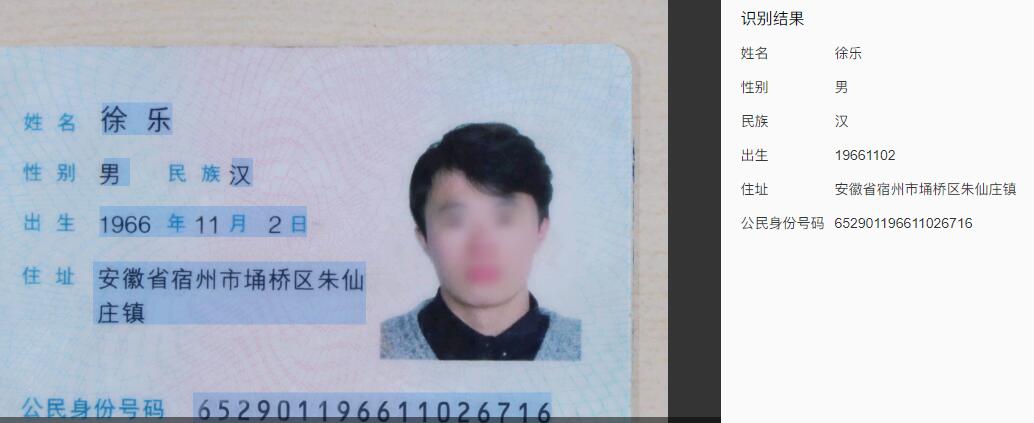
结构化识别二代居民身份证正反面所有8个字段,包括姓名、性别、民族、出生日期、住址、身份证号、签发机关、有效期限,识别准确率超过99%;同时支持身份证正面头像检测,并返回头像切片的base64编码及位置信息。原接口订购地址:https://cloud.baidu.com/product/ocr_cards
接口地址
https://connector.showapi.com/2568-9?appKey={your_appKey}查看密钥调用帮助
返回格式JSON
请求方式POST
案例截图
案例
请求参数
Header 参数
参数名称类型示例值必须描述
content-typeString
application/x-www-form-urlencoded
Post 表单
参数名称类型示例值必须描述
ds_idString
-
数据源
imageString
-
图像数据,base64编码后进行urlencode,要求base64编码和urlencode后大小不超过4M,最短边至少15px,最长边最大4096px,支持jpg/jpeg/png/bmp格式
urlString
https://showapi.oss-cn-hangzhou.aliyuncs.com/modleapi/lzh/231.png
图片完整URL,URL长度不超过1024字节,URL对应的图片base64编码后大小不超过4M,最短边至少15px,最长边最大4096px,支持jpg/jpeg/png/bmp格式,当image字段存在时url字段失效
请注意关闭URL防盗链
id_card_sideString
front
-front:身份证含照片的一面
-back:身份证带国徽的一面
自动检测身份证正反面,如果传参指定方向与图片相反,支持正常识别,返回参数image_status字段为"reversed_side"
detect_riskString
-
是否开启身份证风险类型(身份证复印件、临时身份证、身份证翻拍、修改过的身份证)功能,默认不开启,即:false。
-true:开启,请查看返回参数risk_type;
-false:不开启
detect_qualityString
-
是否开启身份证质量类型(边框/四角不完整、头像或关键字段被遮挡/马赛克)检测功能,默认不开启,即:false。
- true:开启,请查看返回参数card_quality;
- false:不开启
detect_photoString
-
是否检测头像内容,默认不检测。可选值:true-检测头像并返回头像的 base64 编码及位置信息
返回参数
该接口返回经 showapi_res_body 系统封装,业务数据均位于该对象内;系统级字段见
返回体
cURL
curl -X POST "https://connector.showapi.com/2568-9?appKey=YOUR_APPKEY" \
  -H "content-type: application/x-www-form-urlencoded" \
  -H "Content-Type: application/x-www-form-urlencoded" \
  -d "ds_id=&image=&url=https%3A%2F%2Fshowapi.oss-cn-hangzhou.aliyuncs.com%2Fmodleapi%2Flzh%2F231.png&id_card_side=front&detect_risk=&detect_quality=&detect_photo="
返回示例
JSON
{ "log_id": 2648325511,
    "direction": 0,
    "image_status": "normal",
    "idcard_type": "normal",
    "edit_tool": "Adobe Photoshop CS3 Windows",
    "words_result": {
        "住址": {
            "location": {
                "left": 267,
                "top": 453,
                "width": 459,
                "height": 99
            },
            "words": "南京市江宁区弘景大道3889号"
        },
        "公民身份号码": {
            "location": {
                "left": 443,
                "top": 681,
                "width": 589,
                "height": 45
            },
            "words": "330881199904173914"
        },
        "出生": {
            "location": {
                "left": 270,
                "top": 355,
                "width": 357,
                "height": 45
            },
            "words": "19990417"
        },
        "姓名": {
            "location": {
                "left": 267,
                "top": 176,
                "width": 152,
                "height": 50
            },
            "words": "伍云龙"
        },
        "性别": {
            "location": {
                "left": 269,
                "top": 262,
                "width": 33,
                "height": 52
            },
            "words": "男"
        },
        "民族": {
            "location": {
                "left": 492,
                "top": 279,
                "width": 30,
                "height": 37
            },
            "words": "汉"
        }
    },
    "words_result_num": 6}
MCP 服务集成接口级

在 Cherry Studio、ChatBox 等支持 MCP 的客户端中配置,将 {your_appKey} 替换为真实 AppKey(AppKey 管理)。该服务覆盖本接口全部接入点。

MCP JSON
{
  "mcpServers": {
    "showapi-mcp-2568": {
      "url": "http://www.showapi.com.cn/mcp/2568/{your_appKey}"
    }
  }
}
OpenAPI 文档接口级

标准 OpenAPI 3.0 文档,覆盖本接口全部接入点,可导入 Apifox / Postman / Swagger UI,或供 AI Agent 直接消费。