达摩院-文字识别
连接器

达摩院-文字识别

连接器

需两次购买:①订购原厂商接口 ②订购易源会员包代理转发;基于阿里云深度学习技术,为用户提供通用的印刷文字识别和文档结构化等能力。 文字识别技术可以灵活应用于个人证件识别、行业票证识别、资产类证件识别、通用文档识别与整理等行业场景,满足认证、鉴权、票据流转审核等业务需求。

会员资源包统一计费,无需单独购买,开通会员包后可直接调用。
增值税发票识别
接入点说明
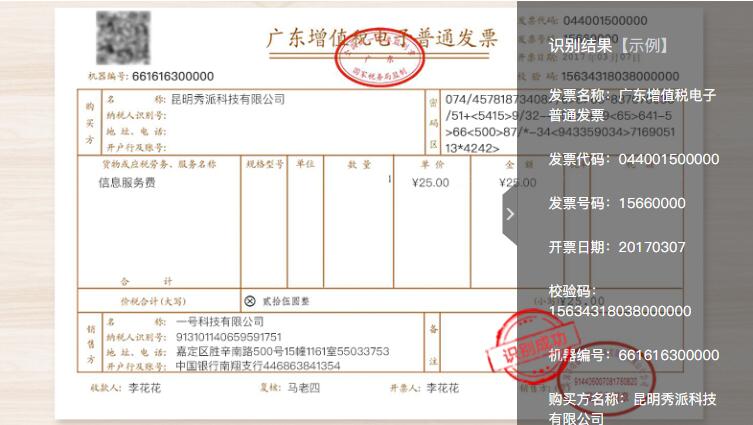
可以识别增值税发票(电子发票和纸质发票)关键字段内容,包括:校验码、复核人、开票人、发票代码、收款人等。阿里原接口订购地址:https://vision.aliyun.com/ocr

输入限制
图片格式:PDF、JPG。
图片大小:大小不超过10M。
图片分辨率:不限制图片分辨率,但图片分辨率太高可能会导致API识别超时,超时时间为5秒。
URL地址中不能包含中文字符。
接口地址
https://connector.showapi.com/2582-22?appKey={your_appKey}查看密钥调用帮助
返回格式JSON
请求方式POST/GET
案例截图
案例
请求参数
Header 参数
参数名称类型示例值必须描述
content-typeString
application/x-www-form-urlencoded
Post 表单
参数名称类型示例值必须描述
FileURLString
https://viapi-test.oss-cn-shanghai.aliyuncs.com/test/ant_ai/vat_invoice/2019041500152001020003743286_0.jpg
图片URL地址。
ds_idString
-
FileTypeString
jpg
输入的图片格式。
返回参数
该接口返回经 showapi_res_body 系统封装,业务数据均位于该对象内;系统级字段见
返回体
cURL
curl -X POST "https://connector.showapi.com/2582-22?appKey=YOUR_APPKEY" \
  -H "content-type: application/x-www-form-urlencoded" \
  -H "Content-Type: application/x-www-form-urlencoded" \
  -d "FileURL=https%3A%2F%2Fviapi-test.oss-cn-shanghai.aliyuncs.com%2Ftest%2Fant_ai%2Fvat_invoice%2F2019041500152001020003743286_0.jpg&ds_id=&FileType=jpg"
返回示例
JSON
{
  "showapi_res_error": "",
  "showapi_res_code": 0,
  "showapi_res_id": "5fc738b08d57ba0347f8e9b1",
  "showapi_res_body": {
    "Data": {
      "Box": {
        "PayeeNames": [
          356,
          833,
          633,
          865
        ],
        "PayeeAddresses": [
          355,
          909,
          734,
          939
        ],
        "InvoiceNoes": [
          1377,
          78,
          1478,
          105
        ],
        "Clerks": [
          986,
          1003,
          1060,
          1033
        ],
        "PayeeBankNames": [
          354,
          947,
          938,
          977
        ],
        "PayerRegisterNoes": [
          358,
          262,
          567,
          290
        ],
        "InvoiceFakeCodes": [
          1376,
          153,
          1640,
          181
        ],
        "InvoiceCodes": [
          1378,
          41,
          1520,
          68
        ],
        "PayerNames": [
          354,
          222,
          700,
          255
        ],
        "PayerAddresses": [
          0,
          0,
          0,
          0
        ],
        "PayerBankNames": [
          0,
          0,
          0,
          0
        ],
        "Payees": [
          189,
          1003,
          264,
          1033
        ],
        "SumAmounts": [
          532,
          774,
          629,
          805
        ],
        "TaxAmounts": [
          1606,
          721,
          1658,
          748
        ],
        "InvoiceAmounts": [
          1364,
          776,
          1438,
          804
        ],
        "InvoiceDates": [
          1376,
          115,
          1596,
          145
        ],
        "WithoutTaxAmounts": [
          1265,
          721,
          1339,
          749
        ],
        "PayeeRegisterNoes": [
          356,
          873,
          571,
          902
        ],
        "Checkers": [
          589,
          1003,
          662,
          1033
        ]
      },
      "Content": {
        "PayeeBankName": "上海浦东发展银行空港支行076389-98910158000000030-22",
        "Payee": "赵弯弯",
        "Checker": "赵弯弯",
        "InvoiceDate": "20190415",
        "PayerBankName": "",
        "Clerk": "赵弯弯",
        "WithoutTaxAmount": "190.48",
        "PayeeRegisterNo": "91310000132284295X",
        "SumAmount": "200.00",
        "TaxAmount": "9.52",
        "AntiFakeCode": "02702870934284730434",
        "PayerName": "百特医疗用品贸易(上海)有限公司",
        "InvoiceCode": "031001600311",
        "InvoiceAmount": "200.00",
        "PayerAddress": "",
        "InvoiceNo": "80625433",
        "PayerRegisterNo": "91310000607402073L",
        "PayeeName": "上海机场(集团)有限公司",
        "PayeeAddress": "上海虹桥机场迎宾二路161号22342185"
      }
    },
    "ret_code": 0,
    "remark": "请求成功",
    "RequestId": "E7BDDA1A-EB91-4E71-9484-9AE2D40F74D4"
  }
}
MCP 服务集成接口级

在 Cherry Studio、ChatBox 等支持 MCP 的客户端中配置,将 {your_appKey} 替换为真实 AppKey(AppKey 管理)。该服务覆盖本接口全部接入点。

MCP JSON
{
  "mcpServers": {
    "showapi-mcp-2582": {
      "url": "http://www.showapi.com.cn/mcp/2582/{your_appKey}"
    }
  }
}
OpenAPI 文档接口级

标准 OpenAPI 3.0 文档,覆盖本接口全部接入点,可导入 Apifox / Postman / Swagger UI,或供 AI Agent 直接消费。